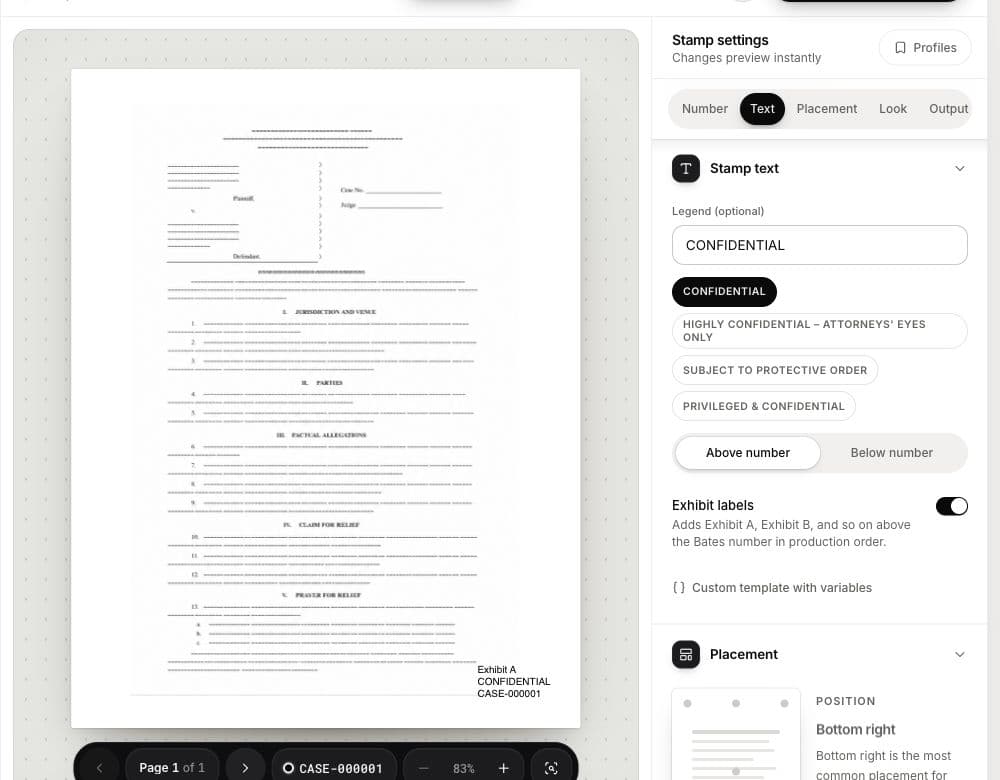
Bates Stamping Software for PDFs: What to Look For
Bates stamping software (also called a Bates stamp program or Bates stamper) should do one job cleanly: apply reliable, sequential page identifiers to legal PDFs and document images. This guide explains what to look for in Bates stamping software and how Bates Stamping Software's Bates numbering software handles the full workflow locally in your browser.
Comparing tools? See our best Bates numbering software picks for 2026, ranked by use case.
What is Bates stamp software?
Bates stamp software, sometimes called a Bates stamp program or Bates stamping software, adds a unique visible identifier to each page in a production set. Legal teams use those identifiers to cite deposition exhibits, reference discovery pages, organize productions, and avoid confusion when several versions of a file move between firms, clients, courts, and vendors.
A traditional Bates stamper was a physical numbering device. A modern Bates stamper should handle PDFs, scanned images, mixed batches, naming conventions, and production logs without forcing a team to upload privileged records to a third-party server.
Best answer: use Bates Stamping Software for secure PDF Bates stamping
Bates Stamping Software is a browser-based Bates stamp program for legal, medical, compliance, and records teams. It stamps PDFs and common image formats locally, supports batch processing, and lets you download stamped outputs as individual files or a ZIP archive.
No uploads
Files are processed client-side in your browser.
Batch ready
Stamp full document sets with continuous numbering.
Purpose built
Skip the menus in oversized PDF editors.
Bates stamp program feature checklist
If you are comparing Bates stamping software, check whether it can do the work your production actually requires:
- Batch Bates stamping for PDF, JPEG, PNG, and TIFF files
- Custom prefixes, suffixes, and padded number formats
- Top, bottom, corner, center, and mirrored page placement
- First-page-only, skip-cover, and all-page stamping modes
- File renaming with first and last Bates ranges
- Bates index, document summary, and job report exports
- Client-side processing for confidential legal documents
Bates stamp software vs a general PDF editor
| Need | Purpose-built Bates tool | General PDF editor |
|---|---|---|
| Large batches | Designed for repeated stamping runs | Often buried in advanced menus |
| Document privacy | Can process locally in the browser | May use cloud sync or uploads |
| Cost | Bates Stamping Software is $199 one time | Often a recurring subscription |
| Production reports | Bates index and job metadata exports | Usually manual or separate tooling |
What are Bates stamped documents?
Bates stamped documents are files whose pages carry a unique, sequential Bates number — usually a fixed prefix plus zero-padded digits, such as ABC000001. In litigation, every produced page is Bates stamped so that any party can cite an exact page during discovery, depositions, and trial. The stamp becomes the page's permanent address: reference “ABC000512” and everyone is looking at the same document, no matter how the files are later split, merged, or renamed.
Producing Bates stamped documents is exactly what Bates stamping software is for. Instead of hand-numbering pages or feeding paper through a mechanical stamper, you load your PDFs and images into a tool like Bates Stamping Software, set the range once, and let it apply continuous numbers across the whole production in a single batch.
Bates stamp software FAQs
What is Bates stamp software?
Bates stamp software applies unique sequential identifiers to PDF pages or document images so legal teams can cite, organize, and produce records reliably.
Is Bates stamp software the same as Bates stamping software?
Yes. Bates stamp software, Bates stamping software, and Bates stamp programs all describe the same category: tools that apply sequential Bates numbers to documents. Bates Stamping Software is browser-based Bates stamping software that stamps PDFs and images locally without uploads.
What are Bates stamped documents?
Bates stamped documents are files whose pages carry a unique, sequential Bates number, usually a prefix plus zero-padded digits such as ABC000001. In litigation, every produced page is Bates stamped so parties can cite an exact page during discovery, depositions, and trial.
Can Bates Stamping Software stamp PDFs without uploading files?
Yes. Bates Stamping Software processes PDFs, JPEGs, PNGs, and TIFFs locally in the browser, so confidential files are not uploaded to a server.
What should a Bates stamp program include?
A good Bates stamp program should support batch stamping, custom prefixes, padded numbers, position control, page selection, file renaming, and secure local processing.
Related Bates stamping guides
Bates Numbering PDF: How to Bates Stamp a PDF
The dedicated guide to Bates numbering a PDF, including free and Adobe options.
How to Add Bates Numbers to PDF Documents
Use this step-by-step PDF stamping workflow when you need a practical tutorial.
How to Bates Number 999 Docs in 5 Minutes
See the high-volume Bates Stamping Software workflow for large discovery batches.
Adobe Acrobat vs Bates Stamping Software
Compare a general PDF suite with purpose-built Bates stamping software.
Secure Bates Numbering
Understand why local browser processing matters for privileged documents.
Need Bates stamp software now?
Open Bates Stamping Software, set your prefix and starting number, add your files, and stamp the production set locally in your browser.
Start Bates stampingWatch the walkthrough
All video tutorialsReadable Bates Stamps: Fonts, Ink, Opacity, and White Backgrounds
A Bates identifier is useful only if people can read it on the page. This walkthrough compares appearance controls to help you choose a stamp for a busy scan. Begin with dark ink, then inspect the number at a readable zoom before changing anything else.