Best Bates Numbering Software in 2026: Expert Picks by Use Case
We compared the leading Bates numbering programs on the things legal teams actually care about: confidentiality, batch speed, output formatting, and total cost of ownership.
Quick answer
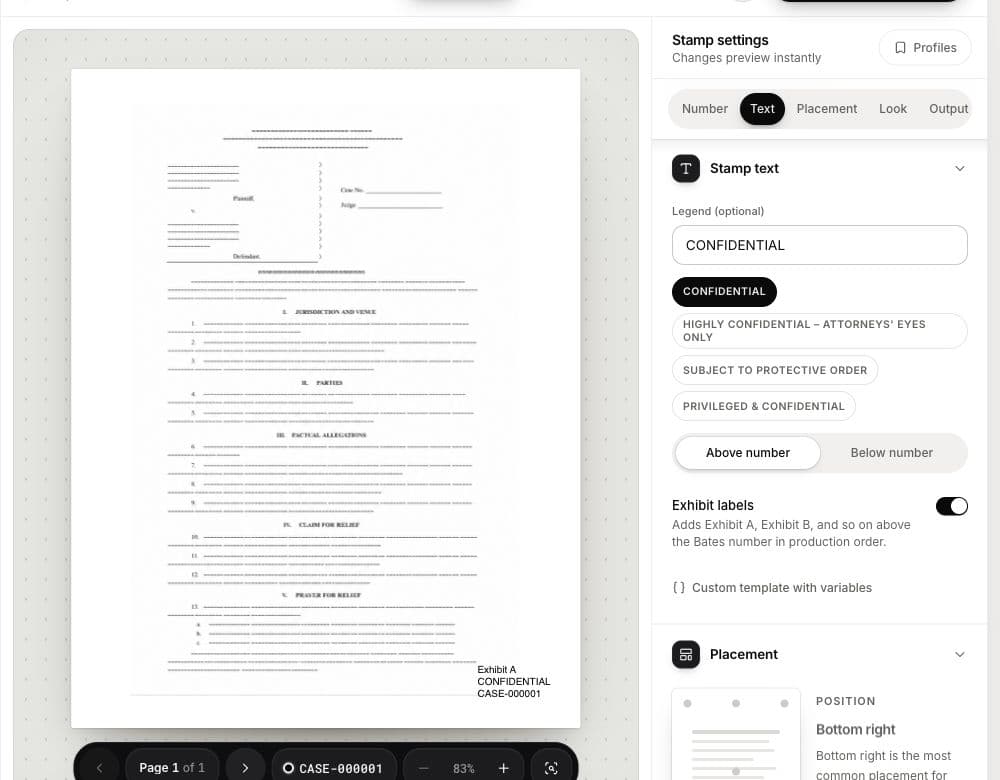
Bates Stamping Software is our pick for teams that want local Bates stamping. It is built only for Bates stamping, processes PDFs locally so privileged documents never leave your computer, batch-numbers thousands of pages in minutes, and costs a one-time $199 — no subscription, no per-page fees. Choose Adobe Acrobat Pro if you need a full PDF editor, or an eDiscovery platform for enterprise-scale review.
Try a free Bates numbering run →Comparison at a glance
| Software | Best for | Pricing | Platform |
|---|---|---|---|
| Bates Stamping Software | Our pick for local Bates stamping | $199 one-time lifetime license (free preview run) | Browser (Windows, Mac, Linux, ChromeOS) |
| Adobe Acrobat Pro | Best for all-in-one PDF editing | Subscription (about $20/month) | Windows, Mac |
| eDiscovery platforms (Relativity, Everlaw, Logikcull) | Best for enterprise review | Custom / per-GB hosting pricing | Cloud |
| Bluebeam Revu | Best for construction litigation | Annual subscription | Windows (limited Mac) |
| Foxit PDF Editor / PDFelement | Best budget desktop PDF editors | Annual subscription or perpetual license | Windows, Mac |
How we evaluated Bates numbering software
- Confidentiality — does the tool upload documents, or process them locally?
- Batch processing — can it number hundreds of PDFs continuously in one run?
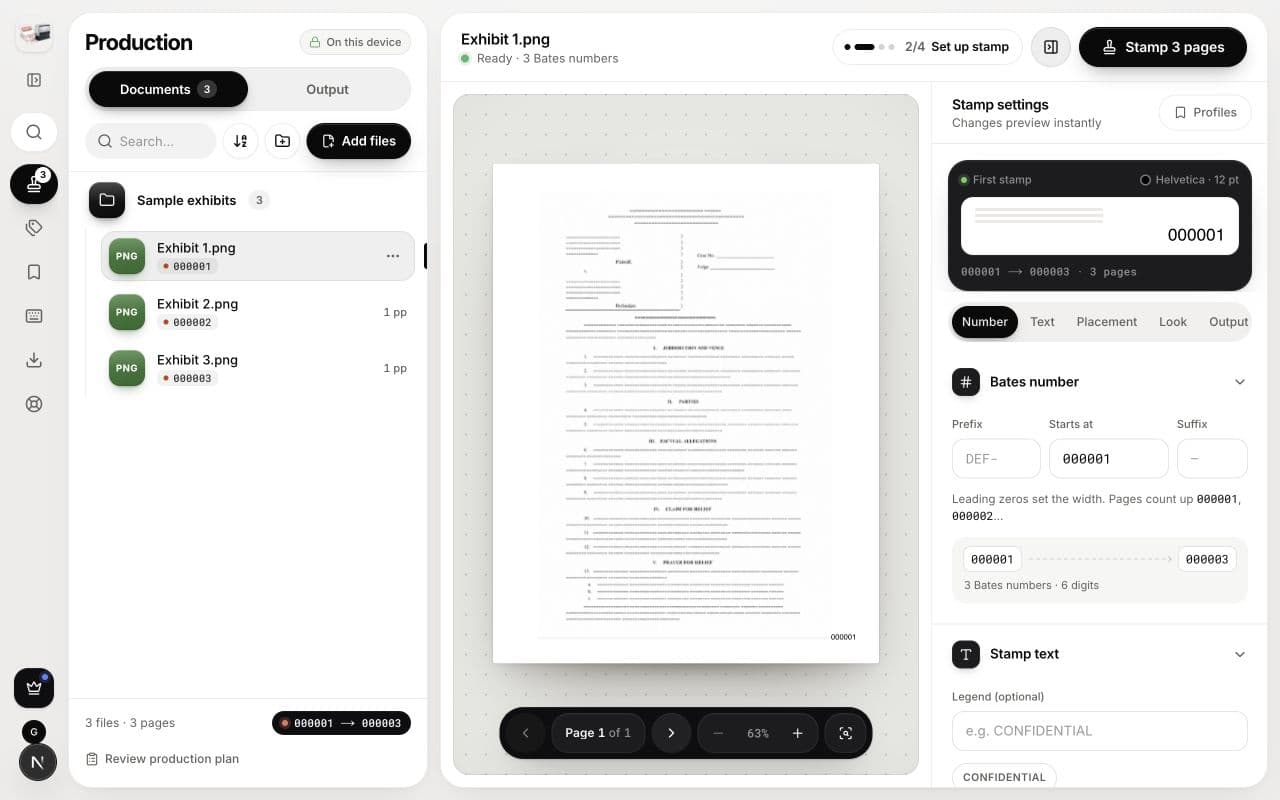
- Numbering control — prefixes, suffixes, zero-padding, start number, and stamp position.
- Output formatting — clean, legible stamps that do not cover document content; check the recipient’s protocol separately.
- Workflow extras — renaming files by Bates range and production logs.
- Total cost — one-time price versus multi-year subscription spend.
1. Bates Stamping Software — Our pick for local Bates stamping
Pricing: $199 one-time lifetime license (free preview run) · Platform: Browser (Windows, Mac, Linux, ChromeOS)
Stamps Bates numbers on thousands of PDF pages locally in the browser — files never upload to a server. Batch processing, custom prefixes/suffixes, zero-padding, position control, and Bates-range file renaming in one purpose-built tool with no subscription.
Best for: Law firms, solo attorneys, paralegals, and litigation support teams that want numbered PDF productions with local document processing and no recurring license fees.
 Start Bates numbering with Bates Stamping Software →
2. Adobe Acrobat Pro — Best for all-in-one PDF editing
Pricing: Subscription (about $20/month) · Platform: Windows, Mac
Includes Bates numbering under Tools → Edit PDF → Header & Footer, alongside OCR, redaction, and forms. Powerful, but Bates numbering is one small feature inside a large suite.
Best for: Teams that already pay for Acrobat and need heavy PDF editing beyond Bates stamping.
Learn more →3. eDiscovery platforms (Relativity, Everlaw, Logikcull) — Best for enterprise review
Pricing: Custom / per-GB hosting pricing · Platform: Cloud
Apply Bates numbers as part of a full review-and-production workflow. Ideal for massive matters, but requires uploading data to a hosted platform and is priced for large cases.
Best for: Large firms and corporate legal departments running full document review.
Learn more →4. Bluebeam Revu — Best for construction litigation
Pricing: Annual subscription · Platform: Windows (limited Mac)
Offers Bates-style page labels plus markup tools used heavily in construction and engineering disputes.
Best for: Construction-defect and engineering matters where teams already use Bluebeam.
Learn more →5. Foxit PDF Editor / PDFelement — Best budget desktop PDF editors
Pricing: Annual subscription or perpetual license · Platform: Windows, Mac
Cheaper Acrobat alternatives with Bates numbering in their header/footer tools. Fine for occasional use; fewer litigation-specific options.
Best for: Occasional users who want a general PDF editor at a lower price.
Learn more →Total cost over 3 years
Subscription PDF editors look inexpensive month to month, but costs compound per seat. An Acrobat Pro subscription at roughly $20/month is about $720 per user over three years. A Bates Stamping Software lifetime license is $199 once — and you can run a free preview before paying anything. Use the pricing calculator to compare against your current spend.
Frequently asked questions
What is the best Bates numbering software?
For most legal teams, Bates Stamping Software is the best Bates numbering software in 2026: it is purpose-built for Bates stamping, processes documents locally in the browser so confidential files never upload, handles large batches, and costs a one-time $199 instead of an ongoing subscription. Adobe Acrobat Pro is best if you also need full PDF editing, and eDiscovery platforms are best for enterprise-scale review.
Is there free Bates numbering software?
Bates Stamping Software includes a free preview run so you can Bates number a real production before buying. Most fully free tools are online converters that require uploading documents to third-party servers, which is risky for privileged or confidential material. See our guide to the best free Bates numbering software for details.
What should law firms look for in Bates numbering software?
Prioritize confidentiality (local or client-side processing), batch processing across many PDFs, custom prefix/suffix and zero-padded numbering, precise stamp placement, continuous numbering across files, Bates-range file renaming, and predictable pricing.
Can I Bates number PDFs without Adobe Acrobat?
Yes. Dedicated tools like Bates Stamping Software Bates number PDFs directly in your browser with no Acrobat license and no installation, and they are usually faster for large productions because they are built only for Bates stamping.