Bates Numbering Software: How to Choose (2026 Buyer's Guide)
Every Bates numbering program claims to do the same thing, but the differences that matter — where your files are processed, how it handles large batches, and what it costs over three years — are easy to miss on a features page. This guide gives you a clear framework for choosing Bates numbering software, plus a pick for each common use case.
Comparing tools? See our best Bates numbering software picks for 2026, ranked by use case.
What Bates numbering software actually needs to do
Bates numbering software applies a unique, sequential identifier to every page of a document set so that any page can be cited, retrieved, and verified later. That sounds simple, and for a handful of pages it is. The problem appears at production scale: thousands of pages, mixed formats, strict court-mandated number formats, and confidentiality obligations that make uploading files to a stranger's server a non-starter.
A good Bates numbering program, therefore, is judged less on whether it can stamp a number and more on how it behaves under those constraints. The seven criteria below are ordered by how much they tend to matter for legal, medical, and compliance teams.
7 criteria for evaluating a Bates numbering program
1. Where your files are processed
Check where document contents are processed, which data the service receives, and the controls your organization requires. Bates Stamping Software processes document contents locally; account, licensing and usage services still make network requests. Review the complete workflow, including the saved files and their delivery.
2. Batch performance at real production scale
A demo with three pages tells you nothing. Good Bates numbering software stamps entire folders with continuous numbering across files, handles thousands of pages without freezing, and lets you reorder documents before processing. Ask how it behaves on a multi-gigabyte production set, not a single memo.
3. Format support (PDF, TIFF, JPEG, PNG)
Discovery arrives in mixed formats. The program should accept PDFs and scanned images (TIFF, JPEG, PNG) in the same batch and output clean, stamped PDFs. If a tool only handles PDFs, you will waste time converting images by hand.
4. Custom formatting and placement
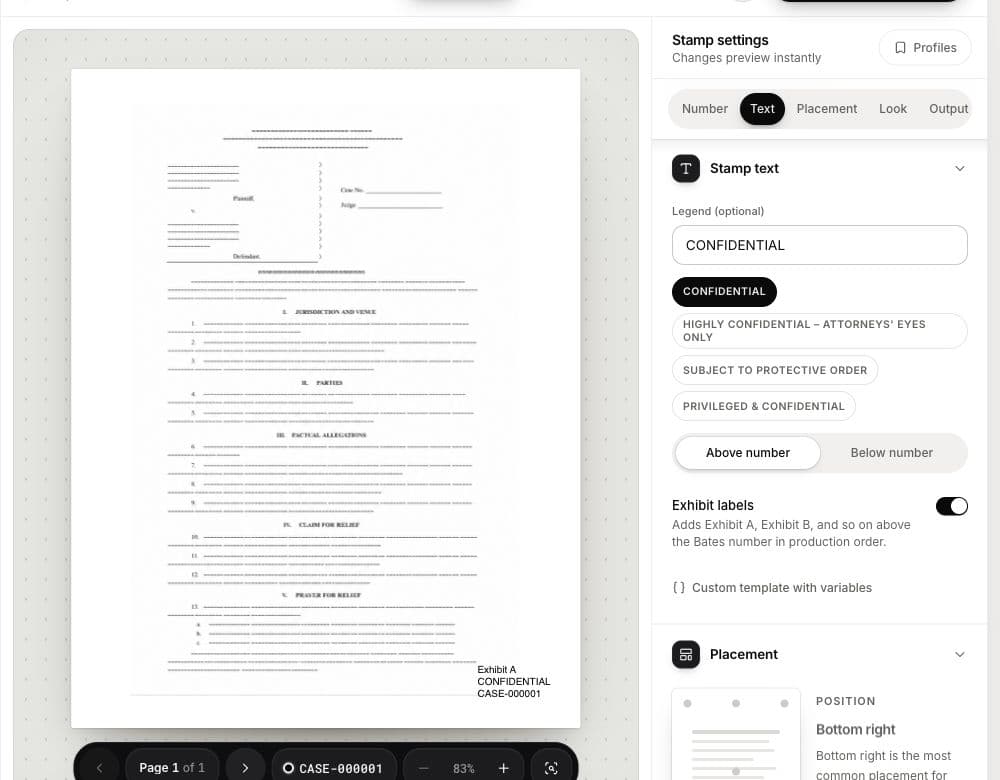
Courts and opposing counsel expect specific formats. Look for custom prefixes and suffixes (e.g. DEF-000001), zero-padding, adjustable starting numbers, and precise position, font, size, and color control so the stamp never overwrites content.
5. File renaming, Bates removal, and labels
The best Bates numbering software does more than stamp. File renaming by Bates range keeps productions organized, Bates removal fixes mistakes without re-scanning, and Avery label generation covers physical exhibits — all without a second tool.
6. Pricing model — subscription vs. one-time
Many Bates numbering programs are sold as recurring subscriptions or bundled into expensive PDF suites you don't need. For a focused task, a one-time purchase is almost always cheaper over any multi-year horizon. Compare total cost of ownership, not the monthly sticker price.
7. Platform (install vs. browser, Mac vs. Windows)
Legacy Bates numbering programs are often Windows-only and require IT to install and update them on every machine. Browser-based software can run on Mac and Windows and can offer PWA installation for direct access. Check browser support, device memory and account or licensing connectivity before relying on a workflow.
Cloud vs. local (client-side) Bates numbering
This deserves its own section because it is where most buyers get it wrong. Many popular “online Bates numbering” tools are convenient precisely because they do the work on their own servers — which means your documents are uploaded, processed, and temporarily stored on infrastructure you do not control. For a marketing PDF that is fine. For a privilege-bearing discovery set, a patient chart, or a sealed corporate investigation, it is a liability.
Client-side Bates numbering software avoids the problem entirely. Tools like Bates Stamping Software use WebAssembly to run the entire stamping engine inside your browser tab. Files are read from your device, numbered in memory, and written back out — with no upload step at any point. Close the tab and the data is gone. You get the accessibility of a web app with the confidentiality of a fully local Bates numbering program. For a deeper comparison, see desktop vs. browser Bates numbering.
Bates numbering software by use case
Law firms & litigation teams
Prioritize clear numbering, checked document ranges and output that matches the agreed production protocol. Bates stamping alone does not satisfy every discovery requirement.
Corporate legal departments
Prioritize confidentiality for internal investigations — local processing keeps sensitive matters in-house.
Medical-records teams
Assess the complete medical-records workflow against your organization’s privacy and security requirements. Local stamping avoids a document upload; it does not certify HIPAA compliance.
Real-estate & closing teams
Prioritize mixed-format handling for closing binders assembled from scans and PDFs.
Free vs. paid Bates numbering software
Free options exist, and for occasional, non-sensitive work they can be enough — but read the fine print. Free cloud tools usually pay for themselves by processing (and sometimes retaining) your uploaded files, and free desktop utilities often cap batch size or lack the formatting control courts expect. Paid Bates numbering software earns its price through reliability at scale, precise formatting, and — critically — a security model you can defend to a client. See our full breakdown of the best free Bates numbering software to weigh the trade-offs. The most cost-effective middle ground is software you can try before paying: Bates Stamping Software gives you one free preview run, then a one-time $199 purchase with no subscription.
Decision checklist & recommendation
Before you buy any Bates numbering program, confirm it can honestly answer “yes” to each of these:
- Does it process files locally, without uploading them?
- Can it batch-stamp mixed PDF/TIFF/JPEG/PNG sets with continuous numbering?
- Does it support custom prefixes, zero-padding, and precise placement?
- Does it include file renaming and (ideally) Bates removal and labels?
- Is it a one-time cost rather than a subscription you don't need?
- Does it run on your platform (Mac and Windows) without IT installs?
If you want software that answers “yes” to all six, Bates numbering software like Bates Stamping Software is built exactly around this checklist — secure, browser-based, and priced as a single purchase.
Related guides
Best Free Bates Numbering Software (Top 10 Compared)
See how the free and paid options stack up before you commit.
The Complete Guide to Bates Numbering
New to Bates numbering? Start with the fundamentals and terminology.
Desktop vs. Browser Bates Numbering
A deeper look at the install-and-upload trade-off covered in criterion 1 and 7.
Adobe Acrobat vs. Bates Stamping Software
Do you need a full PDF suite, or purpose-built Bates numbering software?
Frequently asked questions
- What is the difference between Bates numbering software and a Bates numbering program?
- There is no meaningful difference — the terms are used interchangeably. Both describe an application that applies unique, sequential identifiers to the pages of PDFs and document images. 'Program' often implies a traditional desktop install, while 'software' is the broader term that also covers browser-based tools like Bates Stamping Software.
- Is browser-based Bates numbering software secure for privileged documents?
- Bates Stamping Software processes document contents locally in the browser. That avoids a stamping-server upload, but you still need to assess device security, permissions, your organization’s policies and how the finished files are delivered. Local processing alone does not establish privilege or regulatory compliance.
- Do I need to install Bates numbering software?
- No. Traditional Bates numbering programs require a per-machine install, but browser-based software runs instantly in any modern browser. Bates Stamping Software can also be installed as a PWA for direct workspace access. Internet is required for sign-in and production authorization; installation does not guarantee offline runs.
- What is the best Bates numbering software for Mac?
- Because many legacy Bates numbering programs are Windows-only, Mac users are best served by browser-based software that runs identically on macOS. Bates Stamping Software works in Safari, Chrome, Edge, and Firefox on Mac and Windows with no platform-specific install.
Try the Bates numbering software built around this checklist
Set your prefix and starting number, add your files, and stamp the production set locally in your browser — nothing uploaded. Start with one free preview run.
Open Bates Stamping Software