What is Bates Numbering? Complete Guide for Legal Professionals
Bates numbering is an essential indexing method used by legal professionals to organize, identify, and track documents in litigation and discovery. This comprehensive guide covers everything you need to know.
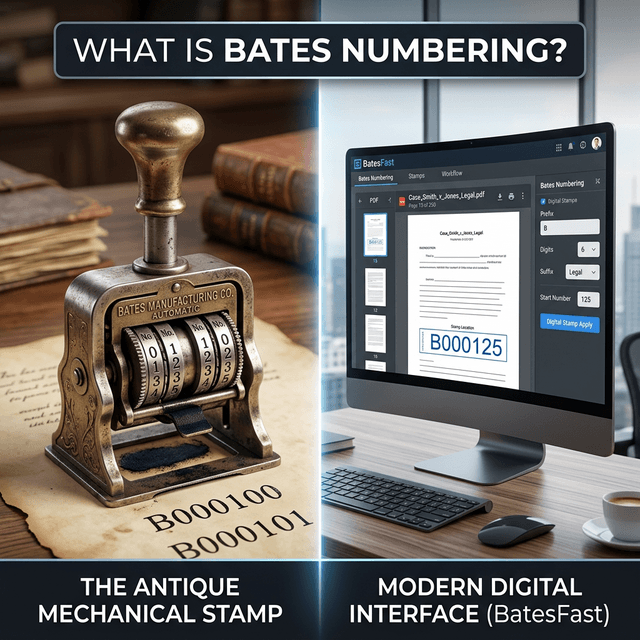
Table of Contents
For worked examples, stamp formats and a full PDF numbering workflow, see our complete guide to Bates numbering.
What is Bates Numbering?
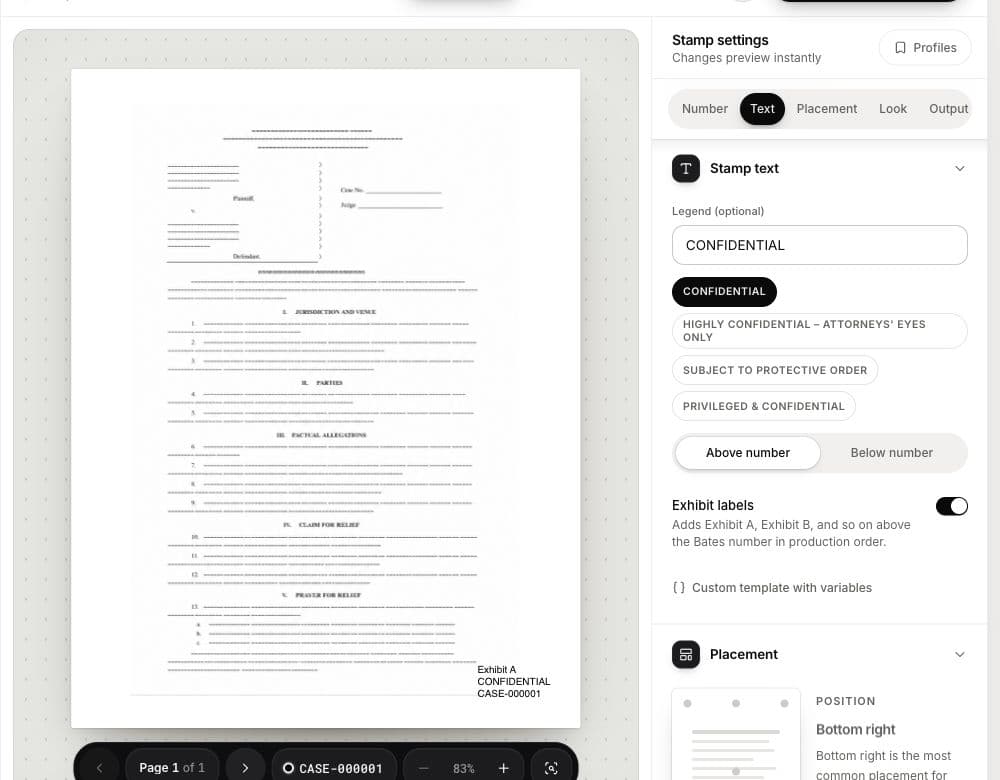
Bates numbering (also called Bates stamping or Bates labeling) is a method of indexing legal documents by placing unique, sequential identification numbers on each page. These numbers typically appear in the header or footer of documents and serve as permanent reference points for organization, retrieval, and citation.
A typical Bates number looks like this: ABC000001, SMITH-0001, or DOC-2026-00001. The format usually includes:
- Prefix: Identifies the case, party, or document type (e.g., "ABC", "SMITH", "DOC-2026")
- Sequential number: Unique identifier that increments for each page
- Suffix: Optional additional identifier (e.g., page number within document)
💡 Key Insight
Bates numbers create a permanent, unchangeable reference system that remains consistent even if documents are reorganized, copied, or distributed to multiple parties.
The History of Bates Numbering
Bates numbering is named after the Bates Automatic Numbering-Machine, invented by Edwin G. Bates in the late 1800s. This mechanical device revolutionized document management by automatically stamping sequential numbers on papers as they passed through the machine.
Before digital technology, law firms and legal departments used physical Bates stamps - mechanical devices with rotating number wheels that incremented with each impression. Paralegals would manually stamp thousands of pages, ensuring each document received a unique identifier.
Today, digital Bates numbering has replaced mechanical stamps, but the terminology and fundamental principles remain unchanged. Modern software can process thousands of pages in seconds while maintaining the same organizational benefits that made the original Bates machine indispensable.
How Bates Numbering Works
The Bates numbering process involves applying sequential identifiers to documents following these steps:
1. Define the Numbering Format
Choose a format that includes:
- Prefix: Case identifier, party name, or document category
- Number of digits: Determines padding (e.g., 000001 vs 0001)
- Starting number: Usually 1 or 0001, but can start at any number
- Suffix: Optional additional information
2. Select Documents
Organize documents in the order they should be numbered. This typically follows:
- Chronological order (date created or received)
- Document type (contracts, emails, reports)
- Relevance to case issues
- Custodian or source
3. Apply Bates Numbers
Using Bates numbering software, numbers are applied to each page. Modern tools allow you to:
- Choose position (header, footer, margins)
- Select font, size, and color
- Add additional text or metadata
- Process multiple documents in batch
4. Create an Index
Generate a document index or privilege log that maps Bates ranges to specific documents, making it easy to locate and reference materials during litigation.
Why Bates Numbering is Important
Bates numbering serves critical functions in legal practice:
Unique Identification
Every page receives a unique identifier, eliminating confusion when referencing specific documents or pages in court filings, depositions, or negotiations.
Document Organization
Sequential numbering creates a logical order for large document sets, making it easier to organize, sort, and manage thousands of pages.
Evidence Integrity
Bates numbers create an audit trail that helps detect missing pages, duplicate submissions, or document tampering during discovery.
Efficient Citation
Attorneys can quickly cite specific pages in briefs, motions, and oral arguments using Bates numbers rather than describing documents.
⚖️ Court Requirements
Bates numbering may be required by a court order, local rule, or production agreement. Rule 34 addresses production organization and format without imposing a universal Bates requirement. See the Federal Rules of Civil Procedure.
Common Use Cases for Bates Numbering
Litigation and Discovery
The most common application of Bates numbering is in civil litigation discovery. When parties exchange documents during discovery, Bates numbers ensure:
- All parties reference the same documents using consistent identifiers
- Privilege logs accurately identify withheld documents
- Deposition exhibits can be easily tracked and referenced
- Trial exhibits maintain consistent numbering throughout proceedings
Corporate Investigations
Internal investigations use Bates numbering to:
- Track documents collected from employees and systems
- Maintain chain of custody for potential evidence
- Organize materials for regulatory submissions
- Create audit trails for compliance purposes
Medical Records Management
Healthcare providers and medical-legal professionals use Bates numbering for:
- Personal injury case documentation
- Medical malpractice litigation
- Workers' compensation claims
- Medical record organization alongside applicable privacy safeguards
Real Estate Transactions
Real estate professionals apply Bates numbers to:
- Title documents and deed records
- Closing document packages
- Property disclosure materials
- Commercial lease agreements
Modern Bates Numbering Tools
Today's Bates numbering software offers significant advantages over traditional mechanical stamps:
Desktop Software
Traditional desktop applications like Adobe Acrobat Pro offer Bates numbering features with:
- Advanced formatting options
- Batch processing capabilities
- Integration with document management systems
- One-time purchase or subscription pricing
Browser-Based Tools
Modern web applications like Bates Stamping Software provide:
- Client-side processing: Documents never leave your computer
- No installation required: Works in any modern browser
- Cross-platform compatibility: Mac, Windows, Linux, ChromeOS
- Affordable: One-time $199 purchase — no recurring subscription fees
- High performance: WebAssembly technology for fast processing
🚀 Try Bates Stamping Software
Bates Stamping Software is a secure, browser-based Bates numbering tool that processes documents entirely on your computer. Start with one free preview run, then a one-time purchase at $199 — no uploads, no recurring subscription. Volume discounts for 15+ licenses.
Bates Numbering Best Practices
1. Establish Consistent Naming Conventions
Use clear, descriptive prefixes that identify:
- Case name or number
- Producing party
- Document category or type
- Production date or batch
2. Use Sufficient Padding
Choose enough digits to accommodate your entire document set. For example, use 6 digits (000001) if you expect to number more than 10,000 pages.
3. Maintain a Document Index
Create and maintain a spreadsheet or database that maps Bates ranges to document descriptions, dates, custodians, and other metadata.
4. Position Numbers Consistently
Place Bates numbers in the same location on every page (typically bottom-right corner) to ensure visibility and consistency.
5. Preserve Original Documents
Always keep copies of original, un-numbered documents in case you need to re-number or produce documents in native format.
6. Document Your Process
Maintain records of your Bates numbering methodology, including format decisions, date ranges, and any special handling for privileged or confidential materials.
Frequently Asked Questions
Is Bates numbering required by law?
Rule 34 does not impose a universal Bates-numbering requirement. A court order, local rule, or production agreement may require numbering. Check the requirements for the case before producing documents.
Can I remove Bates numbers from documents?
Once applied, Bates numbers become part of the PDF and cannot be easily removed without specialized software. This permanence is intentional - it ensures document integrity and prevents tampering. Always work with copies and preserve original documents.
What's the difference between Bates numbering and page numbering?
Page numbers restart with each document (page 1, 2, 3...), while Bates numbers continue sequentially across all documents in a production. Bates numbers uniquely identify every page in an entire document set, not just within individual files.
How many digits should I use for Bates numbers?
Use enough digits to accommodate your expected page count with room to grow. Common formats include 4 digits (0001-9999), 6 digits (000001-999999), or 7 digits (0000001-9999999). Larger cases typically use 6-7 digits.
Can I use Bates numbering for images and non-PDF files?
Yes. Modern Bates numbering tools can process various file types including images (JPG, PNG, TIFF), converting them to PDF with Bates numbers applied. Some tools also support native file stamping for certain formats.
Is online Bates numbering secure?
Security depends on the tool. Browser-based tools like Bates Stamping Softwarethat use client-side processing never upload your documents to servers, keeping sensitive information on your computer. Always verify a tool's security model before processing confidential documents.
Conclusion
Bates numbering remains an essential practice in legal document management, providing unique identification, organization, and citation capabilities that streamline litigation and discovery processes. While the technology has evolved from mechanical stamps to sophisticated digital tools, the fundamental principles and benefits remain unchanged.
Modern browser-based tools like Bates Stamping Softwaremake Bates numbering more accessible than ever, offering professional-grade features without the cost and complexity of traditional software. Whether you're a solo practitioner, paralegal, or part of a large legal team, understanding and implementing proper Bates numbering practices will improve your document management efficiency and professionalism.
Ready to Start Bates Numbering?
Try Bates Stamping Software — secure, powerful Bates numbering in your browser. Start with one free preview run, then $199 one-time.
Try Bates Stamping Software NowWatch the walkthrough
All video tutorialsWhat Is Bates Numbering? Unique Page Identifiers Explained
Bates numbering gives each page in a document set a unique, sequential identifier. This introduction explains the purpose of those identifiers and shows the browser workflow in BatesFast using sample documents.