Bates Numbering for Litigation: Discovery Document Management Guide
Bates numbering is essential throughout litigation, from initial discovery through trial. This comprehensive guide covers best practices for document production, privilege logs, deposition exhibits, and trial preparation.

Table of Contents
Work through a specific production task
Discovery Phase: Initial Document Production
Proper Bates numbering starts with your first document production.
Pre-Production Planning
Before numbering any documents, establish your Bates numbering system:
- Choose a prefix: Use case name, party identifier, or matter number (e.g., "SMITH-2026-")
- Determine padding: Use enough digits for entire case (6-7 digits typical)
- Plan for growth: Estimate total pages and leave room for supplemental productions
- Document your system: Record format decisions for consistency
💡 Pro Tip
Start with number 000001, not 000000. This avoids confusion and follows standard practice. Reserve the first 100-1000 numbers for organizational documents if needed.
Document Organization
Organize documents logically before numbering:
- Chronological order: Most common for litigation documents
- By custodian: Group documents by source person/department
- By document type: Emails, contracts, reports, etc.
- By request: Organize to match discovery request categories
Production Process
Step 1: Review and Organize
Complete document review, privilege screening, and organization before numbering. Changes after numbering create gaps and confusion.
Step 2: Apply Bates Numbers
Use consistent formatting, position, and appearance. Bottom-right corner is standard. Include case identifier in prefix.
Step 3: Create Production Index
Generate spreadsheet mapping Bates ranges to document descriptions, dates, custodians, and request numbers.
Step 4: Quality Control
Verify numbering is sequential, no pages missing, and all documents properly stamped before production.
Privilege Logs and Withheld Documents
Numbering Privileged Documents
Choose identifiers for withheld documents under your matter’s protocol. A privilege log may use internal IDs or Bates references; do not assume withheld documents must share the production sequence:
- Follow the protocol: Confirm the required log fields and identifiers with counsel
- Keep withholding separate: Do not manufacture production gaps unless the agreed workflow calls for them
- Use consistent references: Match each log entry to the retained document record
- Track carefully: Maintain records of which numbers are privileged
See the current Federal Rules of Civil Procedure and the orders for your matter. The following is a fictional entry, not a prescribed log format.
Privilege Log Format
Example Privilege Log Entry:
| Bates No. | Date | Author | Recipient | Description | Privilege |
|---|---|---|---|---|---|
| SMITH-000234 | 03/15/2026 | J. Smith | Attorney Jones | Email re: litigation strategy | Attorney-Client |
⚠️ Important
A Bates number or a privilege-log reference does not establish privilege or decide whether it is waived. Keep withheld material out of the delivery set. If a disclosure mistake occurs, have counsel address it under the applicable rules and orders. Bates Stamping Software does not perform privilege review or create a privilege log.
Supplemental Productions
Continuous Numbering
When the agreed protocol uses one continuous sequence, continue it across productions:
Production Tracking
Maintain detailed records of each production:
- Production date: When documents were produced
- Bates range: First and last number in production
- Page count: Total pages produced
- Request numbers: Which discovery requests answered
- Special handling: Confidential designations, redactions
Deposition Exhibits
Bates numbers streamline deposition exhibit management.
Using Bates Numbers in Depositions
Bates numbers make deposition exhibits easy to identify and reference:
- Exhibit identification: "Marking as Exhibit 1, Bates SMITH-002345"
- Quick location: Find documents instantly by Bates number
- Transcript clarity: Bates numbers appear in deposition transcript
- Post-deposition reference: Easy to locate exhibits later
Deposition Preparation
Organize deposition exhibits by Bates number:
- Create exhibit list with Bates numbers
- Pre-mark exhibits with Bates references
- Prepare exhibit binders organized by Bates range
- Provide opposing counsel with Bates-numbered copies
Trial Preparation and Exhibits
Bates numbers are essential for trial exhibit management.
Trial Exhibit Lists
Courts typically require exhibit lists with Bates numbers:
Example Trial Exhibit List:
| Exhibit | Bates Range | Description | Status |
|---|---|---|---|
| Plaintiff 1 | SMITH-000100-000125 | Contract dated 1/15/2025 | Admitted |
| Plaintiff 2 | SMITH-001500-001502 | Email chain re: breach | Admitted |
Citing Documents in Briefs
Use Bates numbers when citing documents in motions and briefs:
"As shown in the March 15 email (SMITH-002345), Defendant acknowledged the breach..."
Litigation Workflow Optimization
Streamline your litigation workflow with proper Bates numbering.
Document Management System
Integrate Bates numbers into your document management:
- Searchable database: Index documents by Bates number
- Quick retrieval: Find any document in seconds
- Version control: Track document versions by Bates range
- Team access: Everyone references same Bates numbers
Time Savings
Without Bates Numbers
- • "Find the Smith email from March"
- • Search through thousands of pages
- • 15-30 minutes per document
- • Frequent confusion and errors
With Bates Numbers
- • "Find SMITH-002345"
- • Direct database lookup
- • 5-10 seconds per document
- • Zero ambiguity
Best Practices and Common Mistakes
Best Practices
Start Early
Begin Bates numbering during document collection, not right before production deadline.
Maintain Consistency
Use same format, position, and appearance throughout entire case.
Document Everything
Keep detailed records of Bates ranges, production dates, and privilege log entries.
Quality Control
Always verify numbering before production. Check for gaps, duplicates, and errors.
Common Mistakes to Avoid
- Restarting numbering: Don't start over with each production - continue sequentially
- Inconsistent format: Changing format mid-case creates confusion
- Insufficient padding: Running out of numbers forces format changes
- Incomplete withholding record: Failing to prepare the log or other record required by the applicable protocol
- Poor organization: Numbering before finalizing document order
- No backup: Losing records of Bates ranges and production dates
Frequently Asked Questions
Should I number documents before or after privilege review?
Complete privilege review and other content changes before numbering the final delivery set. Keep withheld documents separate and use the log identifiers required for your matter. A numbering tool does not make privilege decisions.
What if I discover additional documents after production?
If your protocol uses a continuous sequence and the first production ended at SMITH-005000, start the next at SMITH-005001. Confirm the last issued number and avoid reusing identifiers already delivered. See the supplemental production guide for a checked workflow.
How do I handle documents produced by opposing counsel?
Opposing counsel's documents keep their original Bates numbers. Don't renumber documents you receive. Reference them by their original Bates numbers in your filings and at trial.
Can I use different prefixes for different document types?
While possible, it's generally better to use one prefix per party/case. Different prefixes complicate tracking and can confuse courts. If needed, use suffixes or separate number ranges instead.
What's the best tool for litigation Bates numbering?
Use tools that offer batch processing, custom formatting, and file renaming. Bates Stamping Software provides all these features with local processing of document contents. Review your device and delivery controls for confidential litigation documents. $199 one-time purchase with one free preview run.
Conclusion
Proper Bates numbering is essential for efficient litigation practice. From initial discovery through trial, Bates numbers provide the organizational framework that makes document management, citation, and presentation possible.
Start with a solid numbering system, maintain consistency throughout the case, and use modern tools like Bates Stamping Software to streamline the process. Your investment in proper Bates numbering pays dividends in time savings, reduced errors, and professional presentation throughout litigation.
Streamline Your Litigation Document Management
Bates Stamping Software makes litigation Bates numbering fast and secure. Process discovery documents in minutes. Start with one free preview run — then $199 one-time purchase, no subscription.
Try Bates Stamping Software NowWatch the walkthrough
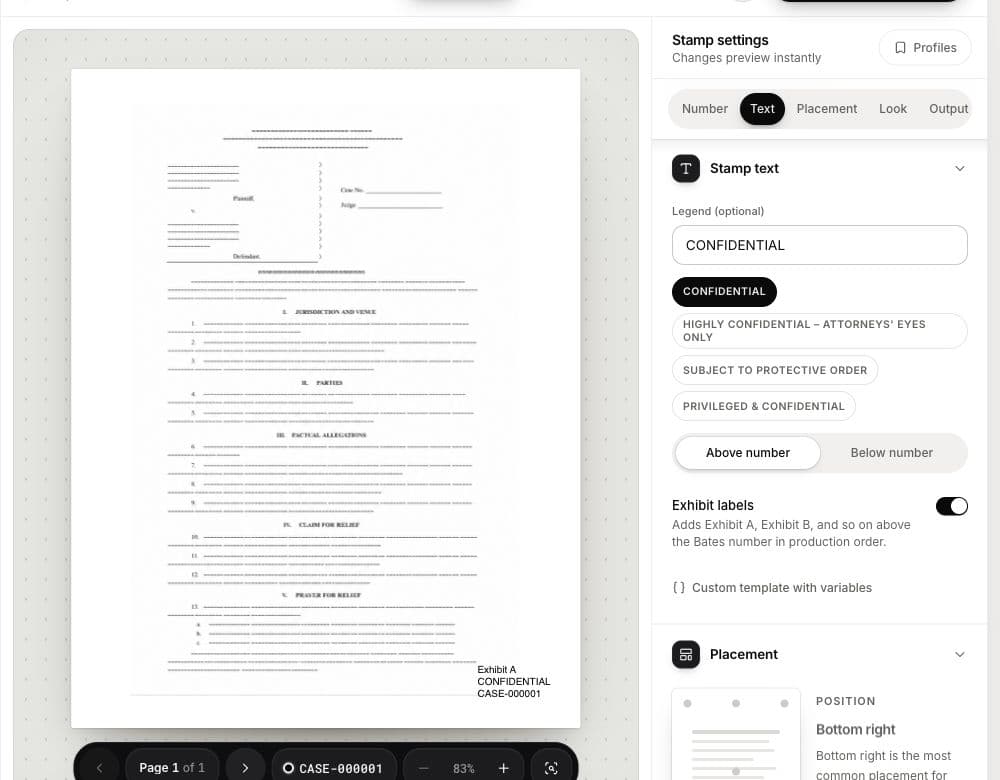
All video tutorialsBates Numbering Legal Documents: Add Automatic Exhibit Labels
Exhibit labels identify documents, while Bates numbers identify the stamped pages within them. In BatesFast, automatic exhibit labels follow the document order: the first document becomes Exhibit A, the second Exhibit B, and so on. The page-number sequence can continue across those documents.