PDF Stamping Technology: WebAssembly & Modern Architecture
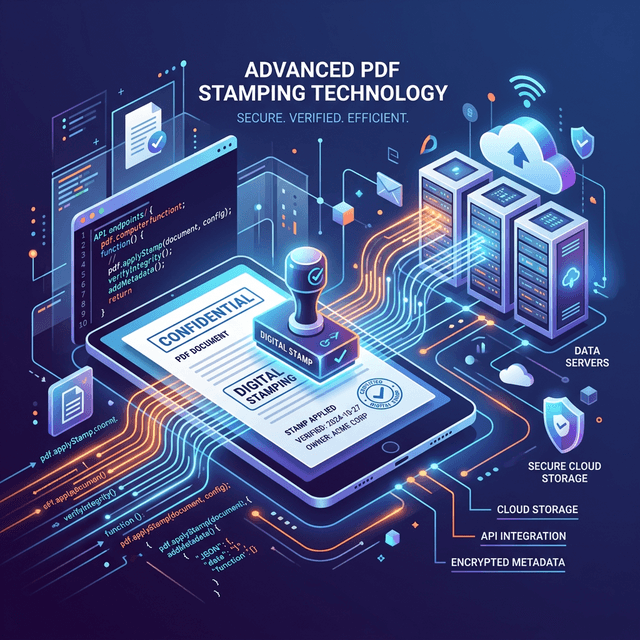
Modern PDF Bates stamping leverages cutting-edge web technologies. Explore how WebAssembly, client-side processing, and browser-based architecture enable fast, secure PDF manipulation without server uploads.
Evolution of PDF Processing
PDF processing has evolved dramatically over the past two decades. Understanding this evolution helps appreciate the capabilities and advantages of modern browser-based PDF stamping tools.
Traditional Desktop Applications (1990s-2010s)
Technology:
- Native C/C++ code compiled for specific operating systems
- Direct file system access
- Platform-specific PDF libraries (Adobe PDF Library, PDFlib)
- Requires installation and admin rights
Advantages: Maximum performance, full system integration, offline operation
Disadvantages: Platform-specific, expensive, requires installation, manual updates
Server-Based Cloud Tools (2010s)
Technology:
- Upload PDFs to remote servers
- Server-side processing using PDF libraries
- Download processed files
- Web-based interface
Advantages: No installation, cross-platform, automatic updates
Disadvantages: Security concerns (file uploads), privacy issues, requires internet, subscription costs
Modern Client-Side Processing (2020s)
Technology:
- WebAssembly for near-native performance
- Client-side PDF processing in browser
- No file uploads—everything local
- Modern JavaScript APIs
Advantages: Security (no uploads), privacy, performance, cross-platform, no installation
Disadvantages: Requires modern browser, subject to browser memory limits
The WebAssembly Revolution
WebAssembly (Wasm) enables compiled code to run in browsers at near-native speed. This breakthrough allows complex PDF processing that previously required desktop applications to run entirely in your browser, combining the convenience of web apps with the performance of native software.
WebAssembly: The Game Changer
What is WebAssembly?
WebAssembly (Wasm) is a binary instruction format that runs in web browsers at near-native speed. It's designed as a compilation target for languages like C, C++, and Rust, allowing developers to port existing high-performance code to the web.
Key characteristics:
- Fast: Executes at 80-95% of native speed
- Safe: Runs in browser sandbox with security guarantees
- Portable: Works across all modern browsers
- Compact: Binary format is smaller than equivalent JavaScript
- Efficient: Designed for fast parsing and execution
WebAssembly for PDF Processing
PDF manipulation is computationally intensive—parsing PDF structure, rendering pages, modifying content, and regenerating files. WebAssembly makes this feasible in browsers:
Performance comparison:
Task: Process 100-page PDF with Bates numbers

Pure JavaScript: 45-60 seconds
WebAssembly: 8-12 seconds
Native Desktop: 6-10 seconds

WebAssembly achieves 80-90% of native performance
PDF Libraries in WebAssembly
Several PDF libraries have been compiled to WebAssembly:
- PDF.js: Mozilla's JavaScript/WebAssembly PDF renderer
- PDFium (Chromium): Google's PDF engine compiled to Wasm
- MuPDF: Lightweight PDF library with Wasm support
- pdf-lib: Pure JavaScript PDF library (no Wasm but browser-native)
These libraries enable complete PDF manipulation—reading, parsing, modifying, and generating PDFs—entirely in the browser.
Client-Side Architecture
How Bates Stamping Software Works
Modern browser-based Bates stamping tools like Bates Stamping Software use a client-side architecture:
Step-by-step process:
- File selection: User selects PDF files using browser file picker
- Local reading: Files read into browser memory (never uploaded)
- PDF parsing: WebAssembly PDF library parses PDF structure
- Page rendering: Each page rendered to determine dimensions
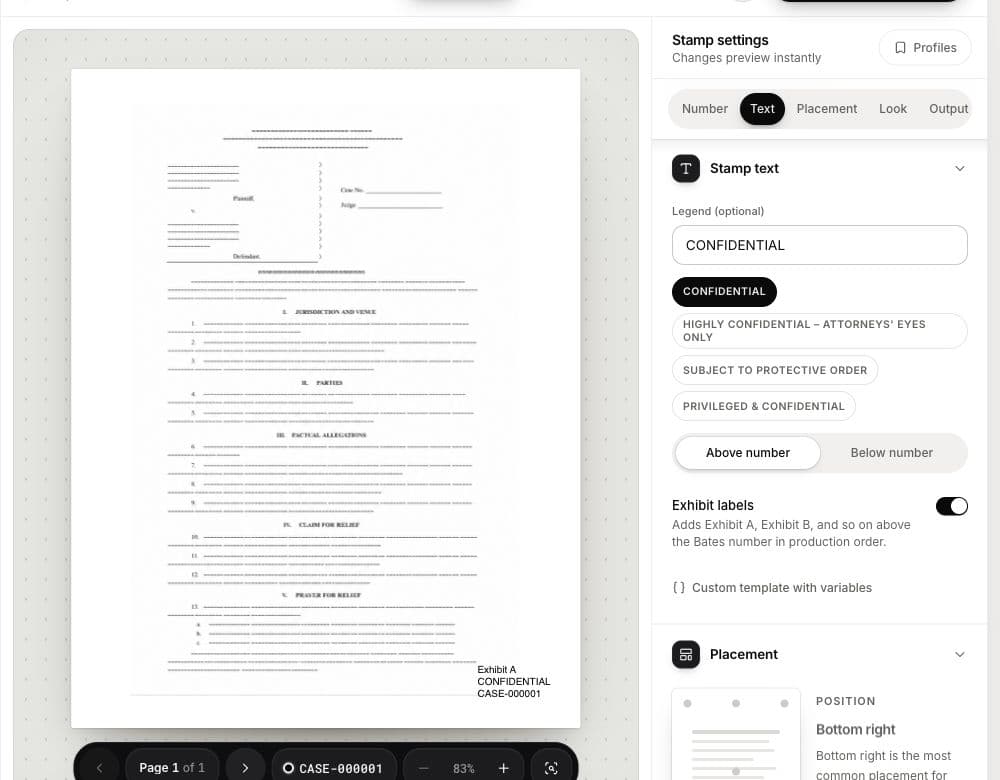
- Stamp application: Bates numbers added to each page
- PDF generation: Modified PDF generated in browser memory
- Download: User downloads processed file directly
Critical point: Files never leave the user's computer. All processing happens locally in the browser.
Browser APIs Used
Modern browsers provide APIs that enable sophisticated PDF processing:
File System Access API:
- Read files from user's computer
- No upload to servers
- User maintains full control
Canvas API:
- Render PDF pages
- Draw Bates numbers
- Generate visual output
Blob API:
- Handle binary PDF data
- Create downloadable files
- Manage memory efficiently
Web Workers:
- Process PDFs in background threads
- Keep UI responsive
- Parallel processing for multiple files
Memory Management
Browser-based PDF processing must manage memory carefully:
Challenges:
- Browsers limit memory per tab (typically 2-4 GB)
- Large PDFs can consume significant memory
- Multiple files multiply memory requirements
Solutions:
- Streaming processing: Process pages incrementally rather than loading entire PDF
- Garbage collection: Release memory as pages complete
- Chunking: Process large files in chunks
- Web Workers: Isolate processing in separate memory spaces
Performance Optimization
Rendering Optimization
PDF rendering is the most computationally expensive operation:
Optimization techniques:
- Lazy rendering: Only render pages as needed
- Resolution control: Render at appropriate DPI (not excessive)
- Caching: Cache rendered pages for reuse
- Progressive rendering: Show progress as pages complete
Parallel Processing
Modern browsers support parallel processing:
- Web Workers: Process multiple files simultaneously
- Page parallelization: Process multiple pages concurrently
- Thread pooling: Manage worker threads efficiently
Performance impact:
Processing 10 files (50 pages each):

Sequential: 60 seconds
Parallel (4 workers): 18 seconds

3.3x speedup with parallel processing
Code Optimization
WebAssembly code can be optimized for performance:
- Compiler optimizations: Use optimizing compilers (LLVM)
- SIMD instructions: Leverage SIMD for parallel operations
- Memory layout: Optimize data structures for cache efficiency
- Minimal allocations: Reduce memory allocation overhead
Security and Privacy
Client-Side Security Model
Client-side processing provides inherent security advantages:
No data transmission:
- Files never upload to servers
- No network transmission of sensitive documents
- No server-side storage or logging
- Complete user control over data
Browser sandbox:
- WebAssembly runs in secure browser sandbox
- Cannot access file system without permission
- Cannot make network requests without user knowledge
- Isolated from other tabs and applications
Privacy Advantages
Client-side processing eliminates privacy concerns:
- No tracking: No server logs of what documents you process
- No retention: No copies retained on external servers
- No third-party access: Only you see your documents
- Local document processing: Avoids sending file contents to a stamping server; does not certify regulatory compliance
Verification
Users can verify client-side processing:
- Network monitoring: Use browser dev tools to verify no uploads
- Connectivity check: Verify sign-in and production authorization on the intended network
- Open source: Some tools provide source code for inspection
- Browser console: Check for network activity
Security Best Practice
For sensitive documents, assess processing location together with endpoint security, organizational policies and delivery controls. Local stamping avoids a document-content upload; it does not remove every confidentiality or security risk.
Browser Compatibility
WebAssembly Support
WebAssembly is supported by all modern browsers:
- Chrome/Edge: Full support since 2017
- Firefox: Full support since 2017
- Safari: Full support since 2017
- Mobile browsers: iOS Safari, Chrome Mobile support Wasm
Minimum versions:
- Chrome 57+ (March 2017)
- Firefox 52+ (March 2017)
- Safari 11+ (September 2017)
- Edge 16+ (October 2017)
Essentially all browsers in use today support WebAssembly.
Progressive Enhancement
Well-designed tools provide fallbacks:
- Feature detection: Check for WebAssembly support
- JavaScript fallback: Use pure JavaScript if Wasm unavailable
- Graceful degradation: Reduce features rather than fail completely
- Clear messaging: Inform users if browser is too old
Future of PDF Processing Technology
Emerging Technologies
WebGPU:
- GPU acceleration for PDF rendering
- Dramatically faster page rendering
- Better handling of complex PDFs
File System Access API:
- Direct file system access from browser
- Edit files in place without download/upload
- Better integration with local workflows
Progressive Web Apps (PWAs):
- Install web apps like native applications
- Offline functionality
- OS integration (file associations, etc.)
Convergence
The line between web and native applications continues to blur:
- Web apps achieving native performance
- Native-like user experiences in browsers
- Cross-platform by default
- Automatic updates without user intervention
For many use cases, browser-based tools now match or exceed desktop applications in capability while offering superior convenience and security.
Frequently Asked Questions
Is WebAssembly as fast as native desktop applications?
WebAssembly achieves 80-95% of native performance. For most PDF processing tasks, this difference is negligible—a 500-page document might take 10 seconds with WebAssembly versus 8 seconds with native code. The convenience advantages of browser-based tools far outweigh the minor performance difference.
How can I verify that my documents aren't being uploaded?
Inspect the Network tab while processing fictional sample files. Bates Stamping Software performs document stamping locally, but account, licensing and usage requests can still appear. Confirm that document contents are not included in those requests; disconnecting the network is not a reliable test because production authorization needs internet.
What browsers support WebAssembly PDF processing?
Use an up-to-date browser with the PDF, WebAssembly and worker features the application requires. Browser support for WebAssembly alone does not guarantee that every app feature or large document will work. Try a representative sample on the intended browser and device.
Are there size limits for browser-based PDF processing?
Browsers typically limit memory per tab to 2-4 GB. This allows processing PDFs up to 500-1000 pages comfortably. For extremely large documents (1000+ pages), desktop software may be more appropriate. Most typical documents process without issues.
Can browser-based tools work offline?
Some browser apps cache selected features for offline access, but this depends on their implementation. Bates Stamping Software stamps document contents locally and can be installed as a PWA; sign-in and production authorization require internet. Installation does not promise a complete offline production workflow.
Is WebAssembly secure for processing sensitive documents?
Yes, WebAssembly runs in the browser's security sandbox with the same protections as JavaScript. Combined with client-side processing (no uploads), it's actually more secure than cloud-based tools that upload documents to servers. Your documents never leave your computer.
How does WebAssembly compare to JavaScript for PDF processing?
WebAssembly is 5-10x faster than pure JavaScript for PDF processing. Tasks that take 60 seconds in JavaScript take 8-12 seconds in WebAssembly. This performance difference makes complex PDF manipulation practical in browsers.
Will browser-based PDF tools replace desktop software?
For most users and use cases, yes. Browser-based tools now offer comparable performance with superior convenience (no installation, cross-platform, automatic updates). Desktop software remains relevant for specialized needs like very large documents or advanced PDF editing beyond Bates numbering.
Conclusion
Modern PDF stamping technology represents a remarkable convergence of performance, security, and convenience. WebAssembly enables near-native performance in browsers, while client-side processing avoids sending document contents to a stamping server. The result is tools that match desktop applications in capability while offering superior convenience and privacy.
For legal professionals, litigation support staff, and anyone handling sensitive documents, understanding this technology helps appreciate why browser-based tools like Bates Stamping Software can provide local document stamping. Check the generated files and the complete handling workflow before using them for a sensitive production.
As web technologies continue advancing with WebGPU, enhanced file system access, and Progressive Web Apps, the capabilities of browser-based PDF tools will only improve. The future of document processing is in the browser, combining the best aspects of web and native applications.
Experience Modern PDF Technology
Try Bates Stamping Software's WebAssembly-powered PDF processing: fast performance, complete security, no installation required. Start with one free preview run, then $199 one-time purchase.
Try Bates Stamping Software Now